FirstBank Fake Pop-Up That Install Malicious Apps and Steal Banking Details



FirstBank of Nigeria has warned customers about a growing fraud scheme involving deceptive pop-up messages that encourage users to install malicious applications, potentially exposing their banking credentials and funds to fraudsters.
Unlike ordinary fake banking alerts, this scheme uses messages designed to persuade customers to take action, including installing or interacting with suspicious applications. Once installed, these applications may gain permissions that allow them to display fraudulent messages over other apps, creating opportunities to steal sensitive information.
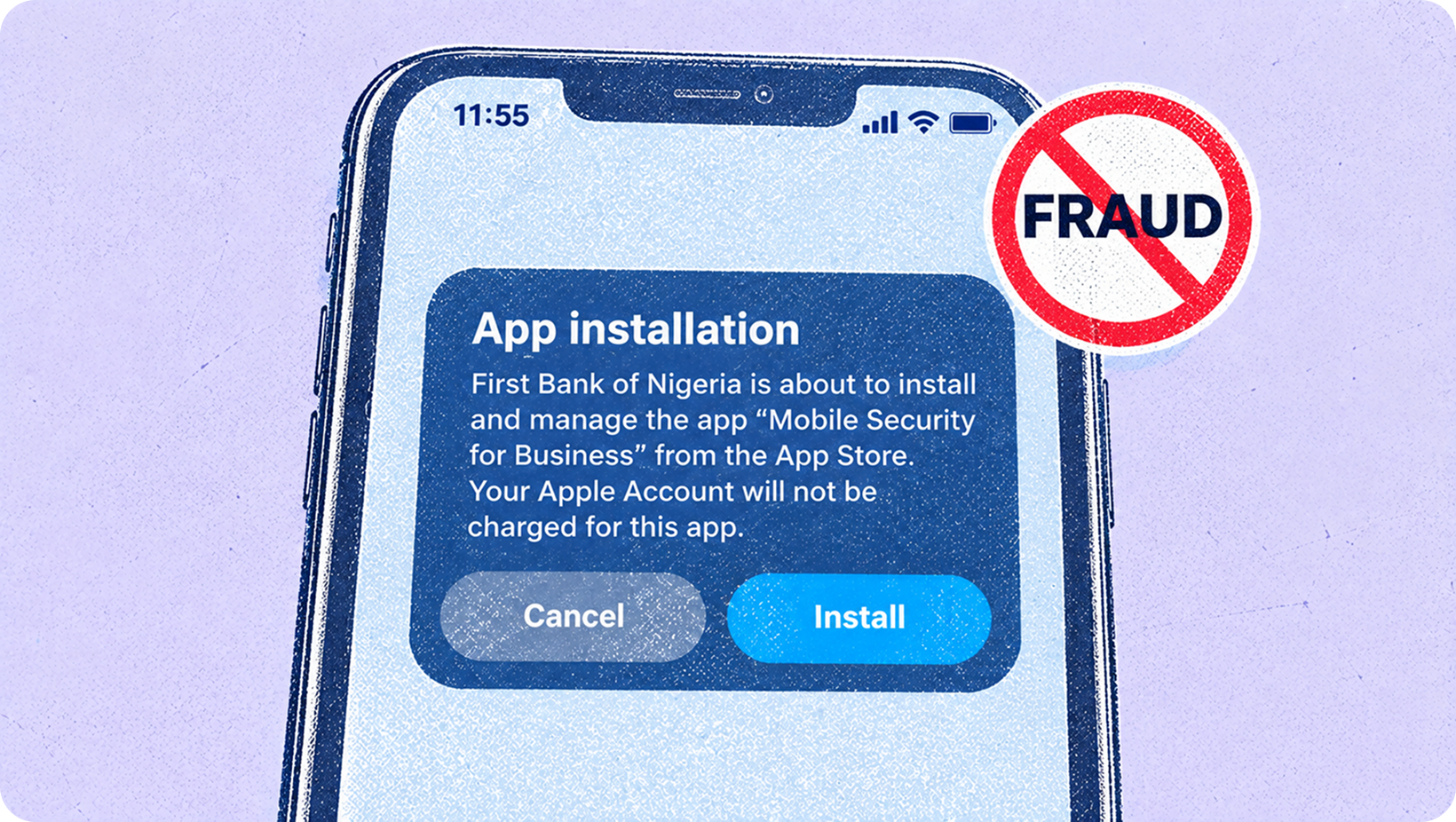
In its security advisory, FirstBank highlighted an example of the fraudulent message:
App Installation: First bank of Nigeria is about tho install and manage the app "Mobile Security for Business" from the App Store. Your Apple Account will not be charged for this app
or
Account abnormal: To ensure the safety of your funds, please login immediately to check your account and complete a small transaction to mitigate the risk, or change your transaction password
These messages are designed to make customers believe their accounts are in danger and that immediate action is necessary. FirstBank, however, stressed that it would never ask customers to make a small transaction or test transfer to verify an account or protect their funds.
How the Fraud Scheme Works
The scheme takes advantage of permissions that allow applications to display content over other applications on a mobile device. Fraudulent applications can exploit these permissions to present convincing messages that imitate legitimate banking communications.
By creating a sense of urgency, fraudsters attempt to get users to follow instructions, disclose their banking credentials or interact with malicious software. If victims provide their passwords, transaction PINs or other confidential details, criminals may use that information to attempt unauthorised access and transactions.
The danger is not limited to the message itself. An unfamiliar application with excessive permissions may continue operating in the background, potentially exposing users to further attacks.
What to Do If You Encounter a Suspicious Pop-Up
FirstBank has advised customers not to click "OK" or enter passwords, PINs or other confidential information when confronted with suspicious pop-ups. Instead, they should close the message without interacting with it.
Customers who suspect that a malicious application has been installed should take the following precautions:
1. Disconnect from the internet
Turn off mobile data and Wi-Fi to interrupt possible communication between malicious applications and their operators.
2. Review applications with overlay permissions
Navigate to Settings → Apps → Special App Access → Display Over Other Apps. Check which applications have permission to appear over other apps and revoke access from unfamiliar or suspicious ones.
3. Check Accessibility permissions
Go to Settings → Accessibility → Installed Services and disable unfamiliar services. Some malicious applications may abuse Accessibility permissions to monitor or control activities on a device.
4. Restart your phone in Safe Mode
FirstBank recommends restarting affected devices in Safe Mode and removing recently installed, rogue or unfamiliar applications. Safe Mode can help users troubleshoot problems caused by third-party apps, although the steps for entering it vary by device.
5. Secure your banking credentials
Using a separate, trusted device, access the official FirstBank digital banking platform and change your passwords and PINs. If you suspect that your account has already been compromised, contact the bank immediately.
FirstBank's Warning to Customers
The bank reiterated that it will never ask customers to transfer money, conduct a test transaction or disclose confidential information to secure their accounts.
Customers should not share online banking passwords, token responses, card numbers, ATM PINs or OTPs with anyone claiming to represent the bank.
For emergencies, customers can use *894*911# to block their accounts. Suspicious calls can be reported through 07080625000 or 014485500, or by emailing abuse@firstbanknigeria.com.
Other customer support and complaints channels provided by the bank include:
02012278000
07080625000
FirstBank also encouraged customers to keep their records updated at its branches and remain vigilant as fraud techniques continue to evolve.
Don't Install Your Way Into a Fraud Trap
A pop-up that promises to protect your money can itself be the beginning of a fraud attempt. The important distinction is that a message appearing on your phone is not necessarily a genuine notification from your bank, particularly when it encourages you to install an application, make a transfer or disclose sensitive information.
Before installing an unfamiliar application or granting it special permissions, consider whether you initiated the download and whether the app comes from a legitimate source. Be especially cautious of instructions that create urgency or promise to resolve a banking problem through an unexpected installation.
Move smart before your money moves